Slashing Claude Code Token Costs: 10+ Proven Tools & Techniques
Every time you type "review this repo" into Claude Code, you might be burning through a quarter million tokens without realizing it. In a real benchmark against a modest 52-file TypeScript library, a single turn consumed 284,473 tokens and cost over $0.26 — before even touching a monorepo. Scale that across a team or a full workday, and you understand why engineers are complaining about $70K monthly bills.
This guide breaks down exactly where tokens disappear, what built-in levers you're ignoring, and which open-source tools actually deliver measurable reductions — tested on a clean Ubuntu 24.04 VM with Claude Code 2.1.116 and Sonnet 4.5.
Where Your Tokens Actually Go
Understanding the token drain before installing anything is half the battle. A typical Claude Code agentic session splits its token budget across four categories:
Typical ShareWhat Drives ItCached system prompt + MCP manifest30–50%Boot overhead, fires every single turnTool call inputs/outputs (Read, Grep, Bash)30–45%The biggest controllable leverExtended thinking / reasoning10–30%On by default; can hit 64K tokens aloneVisible assistant output1–10%Prose + generated code
The hidden killer is auto-compaction. Claude Code triggers an automatic session summary at roughly 93% context fill (around 187K out of 200K tokens). Each compaction reads the entire context at full token rates, then charges again for the summary — and it can fire three or four times in a long session. That's 100K+ tokens per event, completely passive.
Built-In Features Most Developers Never Use
Before buying into any third-party tool, exhaust what's already inside Claude Code. These settings alone can cut 40–60% from a typical session.
Live Context Gauge via Statusline
Add this to ~/.claude/settings.json to get a real-time context percentage in your session bar:
json
{
  "statusLine": {
    "type": "command",
    "command": "echo \"ctx $(jq -r '.context_window.remaining_percentage // 100' < $CLAUDE_STATUS_INPUT)%\""
  }
}
When you see context drop to ~40%, trigger /compact manually — before auto-compaction fires blindly at 93%.
Plan Mode Before Every Non-Trivial Task
Hit Shift+Tab in the TUI before writing code. Plan mode forces the model to map your codebase and propose an approach first. One wrong-path session without this can waste 50K tokens before you realize you're heading in the wrong direction.
Cap Extended Thinking
Reasoning mode is enabled by default and can allocate up to 64,000 tokens per response. For 90% of day-to-day work, that's pure waste:
bash
export MAX_THINKING_TOKENS=8000
Use /effort none for straightforward edits. Use /effort high only when deep reasoning is genuinely required. This single change cuts 20–40% on simple tasks.
Directed Compaction, Not Blind Compaction
The default /compact summarizes everything randomly. Instead, anchor it:
text
/compact Keep: current file structure, the Redis caching decision,
         middleware.ts error, the migration we just wrote
Run this at 60–70% context fill. Your compact will be smaller, more precise, and far cheaper than the automated version.
Subagents via the Task Tool
Each subagent spins up in its own fresh context window. All intermediate Read and Grep output stays inside that subagent — only the final summary comes back to your main session. This pattern alone produces 40–70% fewer tokens in the main thread on research-heavy tasks.
Create a dedicated researcher subagent at .claude/agents/researcher.yaml:
text
name: researcher
description: Read, Grep, Glob across the repo and return a short summary. Use for "find all callers of X" or "where is Y configured" questions.
model: haiku
tools: [Read, Grep, Glob, WebFetch]
Pin it to Haiku for another 3x cost cut on top.
Skills Over CLAUDE.md for Anything Large
CLAUDE.md loads on every single turn. Skills use progressive disclosure — only ~100 tokens of frontmatter load at session start; the full content only activates when needed. Move anything over 2KB (migration playbooks, PR review rules, DB conventions) into ~/.claude/skills/. On a project with 20 procedures, this reclaims 15K+ tokens per session.
10+ Tested Tools — Ranked by Token Reduction
1. Mibayy/token-savior — 43% Saved
What it does: Replaces bulk file reads with symbol-level lookups. Instead of loading an entire 3,000-token file, the model calls find_symbol 'Ky.timeout' and retrieves only the relevant method. Ships 90+ navigation tools plus persistent session memory.
Install:
bash
python3 -m venv ~/bench/venv-tokensavior
~/bench/venv-tokensavior/bin/pip install 'token-savior-recall[mcp]'
claude mcp add token-savior --scope user \
  -e WORKSPACE_ROOTS=/path/to/your/repo \
  -e TOKEN_SAVIOR_PROFILE=core \
  -- /home/ubuntu/bench/venv-tokensavior/bin/token-savior
Important: Use the core profile. The full profile advertises 106 tools, which alone consumes ~11K tokens in the MCP manifest — on short tasks, that cancels most of the gains.
Best for: TypeScript, Go, Rust, Java codebases with frequent cross-file navigation. Less effective on loosely typed JS or Python projects.
2. drona23/claude-token-efficient — 40% Saved
What it does: Eleven behavior rules packed into a 619-byte CLAUDE.md. No MCP server, no hooks, no code. Rules tell Claude to skip filler openers, prefer targeted edits over full rewrites, avoid re-reading unchanged files, and stop when the task is complete.
Install:
bash
cd /path/to/your/repo
curl -o CLAUDE.md https://raw.githubusercontent.com/drona23/claude-token-efficient/main/CLAUDE.md
Honest caveat: The 200-token persistent overhead means this won't help on single-shot debugging prompts. The math pays off on multi-turn coding sessions — which is exactly when you need it most.
3. JuliusBrussee/caveman — 38% Saved
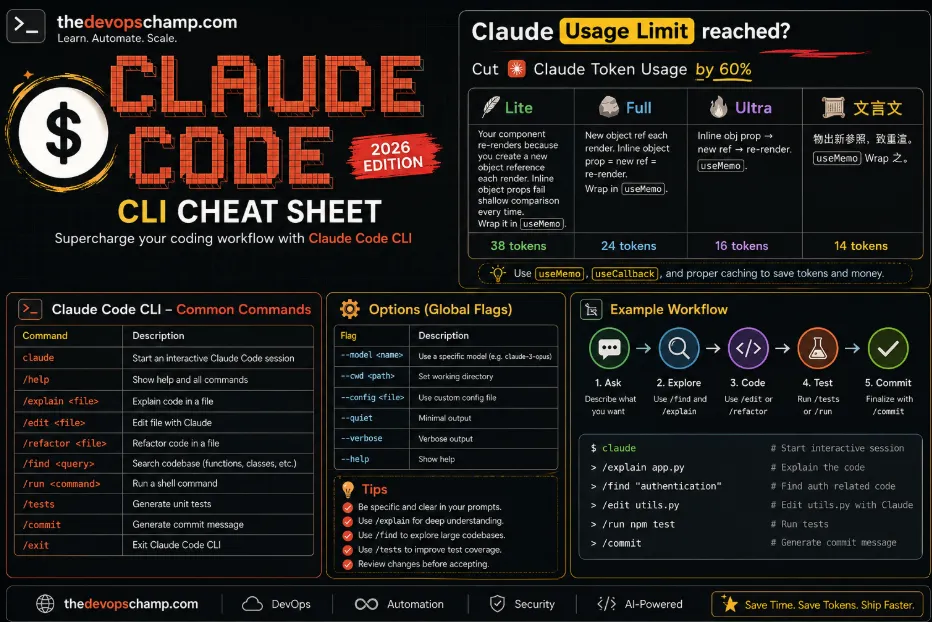
What it does: A Claude Code skill that instructs the model to drop articles, pleasantries, and hedging language while preserving all code, errors, and technical terms verbatim. Ships four compression levels: lite, full, ultra, and wenyan-ultra.
Install:
bash
bash <(curl -sL https://raw.githubusercontent.com/JuliusBrussee/caveman/main/hooks/install.sh)
mkdir -p ~/.config/caveman
cat > ~/.config/caveman/config.json << 'JSON'
{"defaultMode": "ultra"}
JSON
Honest caveat: Caveman compresses assistant prose, not tool I/O. On sessions where Read and Bash output dominate, the prose share is small and so are absolute savings. This tool shines hardest on conversational code reviews, not deep agentic sessions.
4. ooples/token-optimizer-mcp — 23% Saved
What it does: An MCP server that intercepts file reads, grep calls, glob operations, and API responses, then caches results as Brotli-compressed outputs in a local SQLite store. On repeat reads, Claude receives a diff or a cache-key reference instead of full file content. Ships 65 smart tools and a seven-phase hook system.
Install:
bash
sudo npm install -g @ooples/token-optimizer-mcp
claude mcp add token-optimizer-mcp --scope user -- token-optimizer-mcp
bash /usr/lib/node_modules/@ooples/token-optimizer-mcp/install-hooks.sh
Honest caveat: The 95% headline reduction applies only on cache hits. Our single-turn benchmark doesn't stress this much — but long refactor sessions where Claude re-reads the same files after each edit will see 70–90% reduction on those repeated reads. On tiny repos, the 65-tool manifest overhead can actually increase costs.
5. alexgreensh/token-optimizer — 18% Saved
What it does: Installs PreToolUse, SessionStart, SessionEnd, and UserPromptSubmit hooks. Rewrites Read calls into delta-only re-reads for unchanged files. Replaces large file contents with AST skeletons when running through "Structure Map." Also generates a local dashboard at localhost:24842/token-optimizer for monitoring.
Install:
bash
git clone --depth 1 https://github.com/alexgreensh/token-optimizer ~/token-optimizer-alex
cd ~/token-optimizer-alex
bash install.sh
License check: Ships under PolyForm Noncommercial 1.0. Free for individual and open-source use — but commercial deployment inside a company requires a separate license from the author. Read this carefully before team rollout.
6. tirth8205/code-review-graph — 5% on Small Repos, Up to 49x on Monorepos
What it does: Uses Tree-sitter to parse your repo into an AST, stores it in SQLite, and exposes 28 MCP tools that compute blast radius — callers, dependents, affected tests — for any function or file change. Claude navigates impact, not raw file trees.
Install:
bash
uv tool install code-review-graph
cd /path/to/your/repo
code-review-graph install --platform claude-code --yes
code-review-graph build
Honest caveat: 5% on the 52-file benchmark. The 49x figure comes from a 27,732-file Next.js monorepo. The rule is simple — useful when naive file scans waste context on thousands of files; an overhead tax on anything small.
7. rtk-ai/rtk — 0% on Clean Bash, Transformative on Noisy Output
What it does: A Rust binary that wraps git, ls, cat, grep, find, jest, pytest, cargo, and 100+ other commands, rewriting their stdout into deduplicated, filtered compact forms before the output enters Claude's context. A PreToolUse hook makes the substitution transparent.
Install:
bash
curl -fsSL https://raw.githubusercontent.com/rtk-ai/rtk/refs/heads/master/install.sh | sh
export PATH="$HOME/.local/bin:$PATH"
rtk init -g
Honest caveat: On our task — a short git log, a find, a grep — rtk saved exactly nothing because the output was already small. If your sessions include 500-commit git logs, 10,000-entry file trees, or npm install walls of deprecation warnings, this is transformative. If not, it's theater.
8. mksglu/context-mode — Best for Playwright and Log-Heavy Sessions
What it does: An MCP server plus hooks that intercepts large tool outputs — Playwright page snapshots, GitHub issue dumps, log files, big reads — and stores them in a local SQLite database with FTS5 full-text indexing. Claude receives a compact reference and summary instead of the raw 315KB blob, then can issue ctx_search queries against the stored content.
Install:
bash
claude mcp add context-mode --scope user -- npx -y context-mode
License check: Elastic License v2 — source-available but not OSI-approved open source. Internal company use is permitted; reselling as a managed service is not. The enterprise logo claims in the README have no cited sources, so take those at face value.
9. zilliztech/claude-context — Architecturally the Cleanest, Paid Dependencies
What it does: An MCP that chunks and embeds your entire codebase into a Milvus or Zilliz Cloud vector database, then exposes hybrid BM25 + vector search to Claude. Backed by the Milvus company, so the search engine is production-grade. "Which file handles payment webhooks?" becomes a single vector query instead of a full codebase scan.
Install:
bash
export OPENAI_API_KEY="sk-..."
export MILVUS_TOKEN="..."
claude mcp add claude-context -e OPENAI_API_KEY="$OPENAI_API_KEY" \
  -e MILVUS_TOKEN="$MILVUS_TOKEN" \
  -- npx @zilliz/claude-context-mcp@latest
Honest caveat: OpenAI embeddings cost money per index build and per query. Zilliz Cloud has a free tier with limits. Self-hosted Milvus with a local embedding model is supported but not the default path. For repos over 100K LOC, the ROI is excellent. For anything under 10K lines, skip it.
10. nadimtuhin/claude-token-optimizer — Skip This One
A 470-line bash scaffolder that generates a folder structure with placeholder skill files. No hooks, no runtime, no actual optimization logic. No commits since November 2025 — five months stale at time of testing. The 90% savings claim traces back to a single anecdote from one RedwoodJS project. If you want a starter CLAUDE.md, use the drona23 tool above.
Two Ecosystem Tools Worth Adding
musistudio/claude-code-router — Model Routing (3–5x Cheaper per Turn)
Routes requests to different models based on task type: Haiku for background research, Sonnet for standard coding, Opus for hard architectural decisions. Supports OpenRouter, DeepSeek, Ollama, Gemini, and SiliconFlow as alternate providers. Moving 60% of prompts off Opus onto Haiku is a 3–5x cost cut on those specific turns — and this attacks per-turn cost, not just token count.
bash
npm install -g @musistudio/claude-code-router
ccr start
thedotmack/claude-mem — Persistent Session Memory
Captures tool usage and outcomes across sessions, compresses them with Claude, and injects only relevant context at the start of your next session — so you don't re-explain your codebase from scratch every morning. 46K GitHub stars.
bash
# Inside Claude Code
/plugin marketplace add thedotmack/claude-mem
/plugin install claude-mem@claude-mem
Full Tool Comparison
ToolToken LayerRealistic RangeLicense GotchaBest Fittoken-saviorInput (symbol nav)20–43%MITTyped codebasesclaude-token-efficientBehavior (rules)10–40%MITAny multi-session projectcavemanOutput prose30–50% conversationalMITCode reviews, Q&Atoken-optimizer-mcpInput (cached I/O)20–70%MITRepeat-read sessionstoken-optimizer (alex)Input (delta + AST)15–30%PolyForm NCSolo devs onlycode-review-graphInput (AST graph)-30% to 49xMIT1K+ file reposrtkInput (Bash filter)0–90%MIT/Apache conflictLog-heavy sessionscontext-modeInput (offload blobs)20–98%Elastic v2Playwright, log analysisclaude-contextInput (vector search)30–60%MIT + paid deps100K+ LOC monoreposclaude-code-routerCost (model routing)3–5x on routed turnsMITOpus usersclaude-memCross-session stateVariableMITLong-lived projects
Recommended Stacks by Use Case
Solo DevOps engineer, moderate Opus usage:
claude-code-router(Haiku for subagents) + drona23CLAUDE.md+MAX_THINKING_TOKENS=8000- Expected savings: 50–60%, near-zero setup effort
Heavy agentic workflow, large TypeScript codebase:
- token-savior (core profile) + drona23 rules + subagent pattern + deliberate
/compactat 60% context - Expected savings: 55–65%
Monorepo with 10K+ files:
- code-review-graph + claude-context (if OpenAI/Zilliz budget allows) + claude-mem for cross-session state
- This combination can convert a $300/month bill into under $100
Drop-In Config Reference
Project CLAUDE.md (drona23 rules, ~500 bytes):
text
# Project conventions

- Think before acting. Read files before writing code.
- Be concise in output, thorough in reasoning.
- Prefer editing over rewriting whole files.
- Do not re-read files unless they may have changed.
- Skip files over 100KB unless explicitly required.
- No sycophantic openers or closing fluff.
- Test before declaring done.
- User instructions override this file.
Global ~/.claude/settings.json:
json
{
  "env": {
    "MAX_THINKING_TOKENS": "8000"
  },
  "statusLine": {
    "type": "command",
    "command": "echo \"ctx $(jq -r '.context_window.remaining_percentage // 100' < $CLAUDE_STATUS_INPUT)% | $(jq -r '.model.display_name' < $CLAUDE_STATUS_INPUT)\""
  }
}
Bash noise filter hook (strips ANSI + deduplicates repeated warnings before Claude sees them):
bash
#!/usr/bin/env bash
# ~/.claude/hooks/bash-filter.sh
cat | sed 's/\x1b\[[0-9;]*m//g' \
    | awk '!seen[$0]++' \
    | head -500
Wire this under hooks.PostToolUse with a Bash matcher in settings.json. It handles 40–60% of noise from npm install, pip install, and long terraform plan outputs — which are exactly the kind of outputs that silently inflate tokens in a DevOps workflow.