
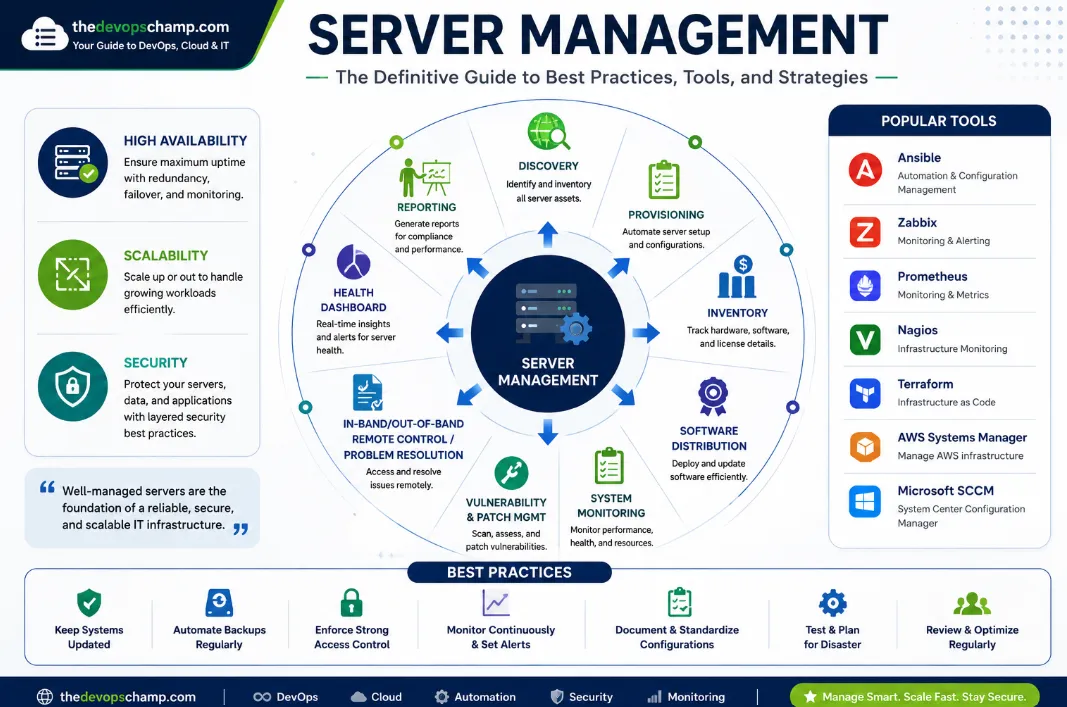
Server Management for DevOps Professionals: CLI-Driven Infrastructure Mastery
In the world of DevOps and cloud infrastructure, server management isn’t just about keeping things running—it’s about mastering the systems that power your applications, services, and digital ventures. Whether you’re orchestrating Kubernetes clusters, automating deployments with Ansible, or hardening Linux servers for STIG compliance, your ability to manage servers efficiently determines the reliability, security, and scalability of your infrastructure.
As a DevOps engineer based in Haryana building multiple tech ventures, I’ve learned that the most effective server management happens at the command line. CLI tools give you direct control, transparency, and the ability to automate complex workflows. In this blog, we’ll dive deep into server management from a DevOps perspective, complete with real CLI examples you can use today.
What Is Server Management in the DevOps World?
Server management for DevOps professionals goes beyond basic monitoring and maintenance. It’s the practice of controlling, optimizing, and automating server infrastructure at scale using command-line tools, configuration management, and infrastructure-as-code principles.
Key objectives include:
- Availability: Ensuring servers are up and serving requests without interruption.
- Security: Protecting infrastructure from threats through hardening, access control, and compliance.
- Performance: Optimizing resource usage to minimize latency and waste.
- Automation: Reducing manual work through scripts, tools, and CI/CD pipelines.
- Scalability: Designing infrastructure that can grow with demand.
Essential CLI Tools for Server Management
DevOps engineers live in the terminal. Here are the most critical CLI tools you’ll use daily for server management:
1. System Monitoring with top, htop, and vmstat
Real-time monitoring is essential. These tools show CPU, memory, and process activity.
# View running processes sorted by CPU usage
top

# Interactive process viewer with color and search (better than top)
htop

# Virtual memory statistics
vmstat 5
Real use case: If your WordPress site slows down, run htop to spot which process is consuming CPU—often a misconfigured PHP script or database query.
2. Disk Usage with df and du
Disk space is finite. Monitor it to avoid crashes.
# Show disk space usage for all filesystems
df -h

# Show detailed disk usage for a directory
du -sh /var/www/html
Pro tip: Set up a cron job to alert you when disk usage exceeds 85%.
3. Network Diagnostics with ss, netstat, and ping
Network issues can cripple services. Use these tools to diagnose connectivity.
# Show active TCP/UDP connections (modern replacement for netstat)
ss -tuln

# Legacy network statistics
netstat -tuln

# Check if a server is reachable
ping -c 4 example.com
Scenario: If your SaaS API is unreachable, run ss -tuln to verify your server is listening on the correct port.
4. SSH and Remote Access Management
SSH is your gateway to remote servers. Secure it properly.
# Connect to a remote server
ssh user@server-ip

# Generate a new SSH key pair (more secure than passwords)
ssh-keygen -t ed25519 -C "[email protected]"

# Copy a file to a remote server
scp myfile.txt user@server-ip:/path/
Security hardening: Disable root login and password authentication in /etc/ssh/sshd_config:
# Edit SSH config
sudo nano /etc/ssh/sshd_config

# Set these values
PermitRootLogin no
PasswordAuthentication no
Then restart SSH:
sudo systemctl restart sshd
5. Package Management with apt, yum, and dnf
Keep your OS and software updated to patch vulnerabilities.
# Update all packages on Ubuntu/Debian
sudo apt update && sudo apt upgrade -y

# Update on Rocky Linux/CentOS 8+
sudo dnf update -y

# Install a package
sudo apt install nginx
Best practice: Automate updates with a cron job or Ansible playbook.
6. Service Management with systemctl
Control which services run and when.
# Start a service
sudo systemctl start nginx

# Enable a service to start on boot
sudo systemctl enable nginx

# Check service status
sudo systemctl status nginx

# List all running services
sudo systemctl list-units --type=service --state=running
Use case: If CyberPanel stops responding, check its status:
sudo systemctl status cyberpanel
Security Hardening and Compliance with CLI
Security is non-negotiable. Here’s how to harden your server using CLI tools.
1. Firewall Configuration with ufw or iptables
# Enable UFW (Uncomplicated Firewall)
sudo ufw enable

# Allow HTTP and HTTPS
sudo ufw allow 80/tcp
sudo ufw allow 443/tcp

# Check firewall status
sudo ufw status verbose
For iptables:
# List all rules
sudo iptables -L -n

# Allow incoming SSH
sudo iptables -A INPUT -p tcp --dport 22 -j ACCEPT
2. STIG Compliance with OpenSCAP
STIG (Security Technical Implementation Guide) compliance ensures your server meets DoD security standards.
# Install OpenSCAP
sudo apt install openscap-scanner

# Run a STIG scan
sudo oscap-xccdf eval -t stig -r /path/to/report.xml /path/to/stig-xccdf.xml
Automation tip: Use Ansible to automate STIG compliance checks across multiple servers.
3. Fail2Ban for Intrusion Prevention
Fail2Ban blocks repeated failed login attempts.
# Install Fail2Ban
sudo apt install fail2ban

# Enable and start the service
sudo systemctl enable fail2ban
sudo systemctl start fail2ban

# Check status
sudo fail2ban-client status
Automation with Ansible and CLI Scripts
Manual work is slow and error-prone. Automation is the key to efficient server management.
1. Ansible Playbook for Server Setup
# server-setup.yml
- name: Configure web server
  hosts: webservers
  tasks:
    - name: Install nginx
      apt:
        name: nginx
        state: present

    - name: Enable nginx service
      systemctl:
        name: nginx
        enabled: yes
        state: started

    - name: Deploy website
      copy:
        src: /path/to/website/
        dest: /var/www/html/
Run it:
ansible-playbook -i hosts.yml server-setup.yml
2. Bash Script for Automated Backups
#!/bin/bash
# backup.sh

BACKUP_DIR="/backup"
DATE=$(date +%F)
SOURCE="/var/www/html"

mkdir -p $BACKUP_DIR
tar -czf $BACKUP_DIR/backup-$DATE.tar.gz $SOURCE

echo "Backup completed: $BACKUP_DIR/backup-$DATE.tar.gz"
Make it executable and run:
chmod +x backup.sh
./backup.sh
Pro tip: Schedule this script with cron:
crontab -e
# Add: 0 2 * * * /path/to/backup.sh
Scalability and Resource Management
As your ventures grow, your infrastructure must scale. Use CLI tools to monitor and manage resources.
free -h

uptime

watch -n 1 'free -h && uptime'
Cloud scaling: If you’re using AWS, leverage the CLI:
aws ec2 describe-instances --query 'Reservations[].Instances[].InstanceId'

aws ec2 start-instances --instance-ids instance-id
Challenges and Solutions in DevOps Server Management
ChallengeSolutionComplexity at scaleUse Ansible, Terraform for automationSecurity threatsHarden with UFW, Fail2Ban, STIG complianceHuman errorAutomate with scripts and CI/CD pipelinesResource constraintsMonitor with htop, free, dfDowntime during failuresImplement backups and disaster recovery
The Future: AI-Powered and Cloud-Native Server Management
The next evolution in server management is AI-driven automation and cloud-native architectures:
- AI for prediction: Tools that predict failures and optimize resources.
- Kubernetes: Managing servers as containers for better scalability.
- Zero-trust security: Assuming no part of your infrastructure is trusted by default.
- Cloud elasticity: Using AWS Auto Scaling and Azure Load Balancer for dynamic scaling.
As a DevOps engineer building SaaS and blogging platforms, staying ahead of these trends ensures your infrastructure is resilient and future-ready.
Final Thoughts: Master Server Management at the CLI
Server management for DevOps professionals is a blend of technical mastery, automation, and security. The command line is your most powerful tool—it gives you direct control, transparency, and the ability to automate complex workflows.
By mastering CLI tools like htop, ss, ufw, ansible, and bash, you can ensure your infrastructure is reliable, secure, and scalable. Whether you’re managing a single Ubuntu server or orchestrating a Kubernetes cluster across AWS, the principles remain the same: monitor proactively, automate relentlessly, and secure aggressively.